
Your CRM can do it. The question is whether your organization can.
Part 3 of 9 in our CRM Selection series.
In Which CRM Should We Buy?, I argued that choosing a CRM is really an operating-model decision. This post looks at where that decision most often goes wrong: in the gap between what a platform can do and what your business actually needs it to do.
CRM vendors naturally demonstrate breadth: AI assistants, forecasting, journey orchestration, lead scoring, predictive analytics, Customer 360, marketing automation, conversation intelligence, personalization, next-best actions and workflow automation. Spend an hour in a well-orchestrated demo and it’s easy to walk away thinking, “Look at everything this platform can do.”
That reaction is justified. Modern CRM platforms are extraordinarily capable, and the technology available today would have been almost unimaginable when I started working with CRM 26 years ago. But after more than 50 CRM advisory engagements and more than 280 implementations, I think organizations are better served by a different question:
“What must our organization be able to do exceptionally well?”
The two questions sound similar. One focuses on the capabilities of the technology, and the other on the capabilities of the business. The distance between them is where much of CRM’s complexity, cost and implementation risk lives.
Key Takeaways
-
A CRM feature is rarely just a feature. Behind most checkboxes sits a cross-functional business capability that the software can support but can’t supply.
-
The capabilities your organization truly depends on, often a small fraction of what the platform offers, matter far more than the rest of the brochure.
-
Familiar requirement names like “quoting,” “forecasting” and “email marketing” hide the assumptions and dependencies that derail projects. Evaluate how your business needs to operate, not which features exist.
A CRM Feature Is Rarely Just a Feature
Consider pipeline forecasting. Almost every major CRM platform can demonstrate forecast categories, weighted pipeline, AI-assisted predictions, manager adjustments, historical trends, dashboards and probability modeling. So forecasting gets reduced to a box on a capability matrix: Forecasting: Yes.
But what does “yes” actually mean? Accurate forecasting depends on far more than whether the software has a forecasting module. It depends on questions like these:
-
Are opportunity stages consistently defined, with meaningful entry and exit criteria?
-
What counts as a qualified opportunity, and who owns it?
-
How are close dates set and maintained?
-
Are probabilities assigned manually, by stage or by an algorithm?
-
Are sales activities consistently captured?
-
Are products, quantities, pricing and expected revenue accurately represented?
-
How are renewals, recurring revenue or consumption-based revenue handled?
-
How often are opportunities reviewed, and what happens when one stalls?
-
How consistently do salespeople actually use the system?
That may only be the beginning. For a manufacturer or distributor, forecasting has downstream operational consequences. Now you may need to understand product availability, production capacity, inventory, seasonality, lead times, backorders, allocations, distribution channels, customer-specific pricing, ERP data and demand planning.
Suddenly pipeline forecasting isn’t just a CRM feature. It’s a cross-functional business capability supported by CRM technology. How does ERP data get into the CRM, and which system owns which information? How current does it need to be? What does sales need to know about availability before committing to a customer? Does the business forecast revenue, units, demand, capacity or some combination of all four?
The CRM platform may provide forecasting out of the box. The organization doesn’t.
The CRM Capability Paradox
I’ve watched a paradox become more pronounced as CRM technology has improved:
The easier vendors make advanced capabilities to access, the easier it becomes to underestimate what the organization must do to use them well.
Twenty years ago, the limitations of the technology were often obvious. Today they aren’t. A vendor can demonstrate an extraordinarily sophisticated capability in ten minutes, and it looks intuitive because the demo environment has things your organization probably doesn’t have yet: clean data, defined processes, configured rules, established relationships, agreed terminology, known ownership, and users behaving exactly as expected.
Those aren’t incidental details. They’re what make the demo work, and your organization has to supply them.
AI Makes the Paradox Even Stronger
Over the last several years I’ve seen remarkable advances in how AI can support sales, marketing, customer service and broader customer operations. Summarizing interactions, drafting communications, identifying patterns, recommending actions, scoring leads, analyzing conversations, enriching records, predicting outcomes and automating service interactions are all legitimate advances.
But AI doesn’t eliminate the need for operational discipline. In many cases it makes that discipline more important:
|
If AI is… |
It depends on… |
|---|---|
|
Analyzing opportunity data |
Opportunity stages being used consistently |
|
Recommending next actions |
Complete activity history |
|
Summarizing the customer relationship |
Knowing where that relationship data comes from |
|
Drawing on CRM, ERP, ecommerce, marketing, service, spreadsheets and inboxes |
Knowing which sources to trust |
|
Working with duplicate customer records |
Knowing which customer is the customer |
|
Scoring leads |
An agreed definition of a qualified lead to optimize for |
AI can accelerate an operating model, automate parts of it and find patterns within it. It can’t compensate for an operating model the organization has never clearly defined.
That’s why I get concerned when the business case for AI begins with “We need AI.” A much better starting point is “What business decision, process, interaction or outcome are we trying to improve?” Then decide whether AI is the right way to improve it. Technology should follow the problem, not lead it. We lay out how to test that use case by use case in How to Prepare Your Business for AI-Enabled CRM.
The 5% Is Where the Real Work Is
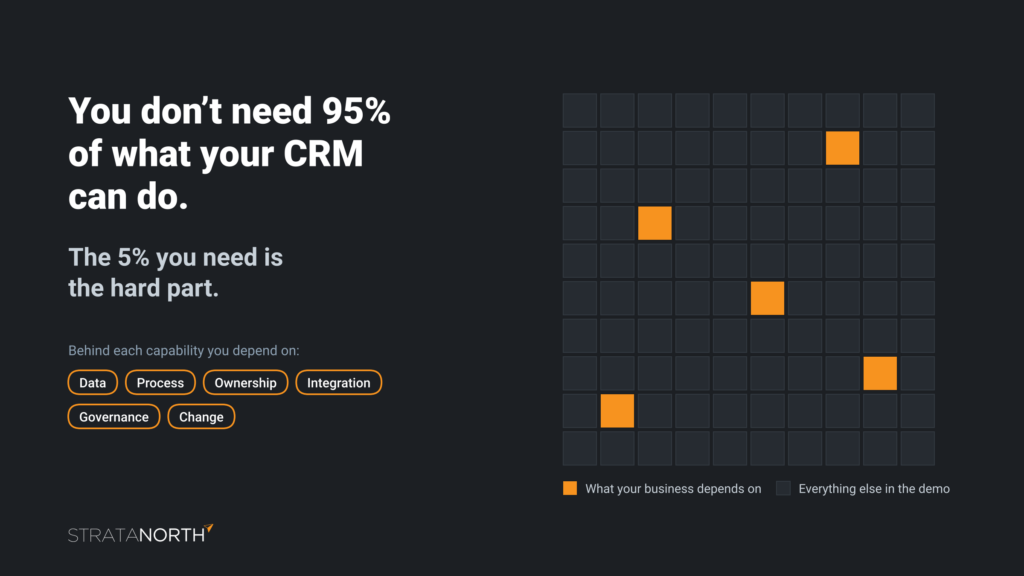
Most businesses will never use everything their CRM platform can do, and they don’t need to. One of the most important lessons from decades of CRM work is that the small set of capabilities your organization absolutely depends on matters far more than everything else in the product brochure. Call it 5%. The exact share varies by organization, but the principle holds.
A smaller organization may need fewer capabilities than a multinational with multiple business units, geographies, product lines, currencies, channels, regulatory requirements and integrations. But smaller doesn’t necessarily mean simpler. I’ve worked with small organizations that had surprisingly complicated sales models, quoting processes, product structures, channel relationships, customer hierarchies, commissions and approvals, and with large ones where parts of the CRM operating model were relatively straightforward. As we covered in Part 2, company size is a poor proxy for complexity. You have to understand how the business actually works.
The Shiny Objects Usually Aren’t Where Projects Get Into Trouble
Organizations understandably gravitate toward capabilities that are easy to picture. AI, predictive analytics, beautiful dashboards and automated journeys are exciting. Projects tend to run into trouble much further down in the machinery:
-
Who owns the account, and what happens when two divisions sell to the same customer?
-
How are parent and subsidiary relationships represented?
-
Where does pricing come from, and which system owns the product record?
-
What counts as a qualified lead, can sales reject one, and what happens when they do?
-
When does an opportunity become an order?
-
How are duplicates handled, and who can modify customer information?
-
What happens when an employee leaves?
-
How does a customer opt out of communications?
-
What happens when the CRM and ERP disagree?
None of these questions are exciting in a software demo. They’re often far more consequential to a successful implementation.
A Real-World Example: When “Quoting” Wasn’t Just Quoting
I saw this play out with a mid-sized manufacturer. At a high level, the requirement sounded straightforward: sales needs to generate quotes from opportunities. Nothing about that sounds complicated.
But the organization hadn’t fully documented how quoting worked across its sales organization, product structure, configure-price-quote (CPQ) platform and downstream systems. As the implementation moved into design and configuration, the team kept uncovering dependencies. Where did product configuration happen? Which system determined pricing, and where were discount rules maintained? Which application was authoritative for product information? What had to move between CRM and CPQ, and what happened when a quote changed? When did a quote become an order, and what then needed to reach ERP? What happened when products had manufacturing or availability constraints, and who approved exceptions?
What looked like a CRM quoting capability during evaluation was actually an end-to-end quote-to-order process spanning multiple applications, business functions, data domains and integration points. It was eventually addressed, but later than it should have been, creating unplanned cost, scope pressure and timeline impact.
So what failed? It wasn’t the CRM or the implementation partner. AI wouldn’t have caught it, and the organization wasn’t unusually complicated. The mistake was much simpler:
Everyone assumed they understood the requirement because it sounded familiar.
That’s one of the most dangerous assumptions in enterprise technology.
Familiar Words Hide Enormous Complexity
This happens constantly in CRM. Organizations use familiar terms like lead management, account management, opportunity management, email marketing, customer service, quoting, forecasting and Customer 360. Everyone around the table nods because everyone recognizes the words. But recognition isn’t agreement:
|
Ask… |
And you may find… |
|---|---|
|
Five stakeholders to define a qualified lead |
Five different answers |
|
Marketing and sales when lead ownership transfers |
An argument that has existed for years |
|
Finance and sales which system owns customer pricing |
Two different systems |
|
What “Customer 360” means |
One person picturing sales activity, another expecting orders, invoices, service cases, web behavior, marketing engagement, contracts, product usage and profitability |
That’s why effective CRM requirements can’t be a catalog of nouns. They have to describe how the business needs to operate.
Email Marketing: Three Yeses, Three Very Different Answers
Email marketing often looks deceptively simple. Ask three CRM vendors whether their platform handles email marketing and there’s a good chance all three say yes. Technically, all three may be right, but that answer tells you remarkably little. The meaningful questions come next:
-
Scale and type: What volume will you send? Are you B2B, B2C or both? Are you sending newsletters, transactional messages, nurture campaigns, promotions, triggered journeys or all of them? What happens during seasonal spikes?
-
Consent and preferences: How are consent and communication preferences managed, and where does that data live? How do unsubscribes work across business units or brands, and what happens when a customer unsubscribes in one system but stays active in another?
-
Deliverability: What are your domain and sender reputation requirements? How will email authentication (SPF, DKIM and DMARC) be managed? Do you need dedicated sending infrastructure? How are bounces and suppression lists handled, and who owns and monitors deliverability?
-
Data and segmentation: What are your segmentation requirements, and how will ecommerce behavior influence marketing journeys?
-
Compliance: What are the data residency, privacy and regulatory considerations?
Now compare the three vendors again. They may all still say yes, but the architecture, operating requirements, licensing, integration effort, specialist skills, risk and total cost behind those three yeses can be dramatically different. We cover how to find out what a vendor’s yes really means in Every CRM Vendor Says Yes.
Capability evaluation can’t stop at “Can the product do it?”
Out of the Box Doesn’t Mean Out of the Organization
A vendor may legitimately describe something as “out of the box.” That usually means the software capability already exists. It doesn’t necessarily mean your organization can turn it on Monday morning and start realizing value. There may still be data, process, configuration, integration, security, governance, training and change-management requirements, along with licensing and operating-model implications.
The feature may be out of the box. The business capability rarely is. As CRM platforms keep getting more capable, that distinction matters more, not less.
The Questions Behind the Checkbox
This is why I’m such a strong advocate for requirements-driven CRM evaluation. A capability matrix shouldn’t simply ask whether a vendor supports something. It should help the organization understand what that capability means for this business:
|
Instead of asking… |
Ask… |
|---|---|
|
Does the vendor support forecasting? |
What does forecasting mean for our business, and what does it depend on? |
|
Does the platform support lead management? |
How must leads enter, qualify, route, transfer, age, get rejected, recycle, convert and be reported within our operating model? |
|
Does the platform provide Customer 360? |
Which customer information must be available, from which systems, at what latency, to which users, under what security model and for what business purpose? |
|
Does it have AI? |
Which decisions or activities are we trying to improve? What information will the AI need, and how trustworthy is it? What actions should it be allowed to take, and where must a person stay accountable? |
That’s where a capability matrix becomes more than a checklist. It becomes a diagnostic instrument, which is exactly how we designed the CRM Vendor Capability Matrix.
Don’t Buy the Demo. Diagnose the Business.
The purpose of CRM evaluation isn’t to find the vendor with the longest feature list. Modern platforms have made that increasingly irrelevant. The objective is to understand:
-
How does our business need to operate?
-
Which capabilities are truly critical to that operating model?
-
What data, processes, integrations, governance and organizational disciplines do those capabilities depend on?
-
Where are we standardized today, and where aren’t we?
-
What needs to change before or during implementation?
-
Which platform can support that model with acceptable complexity, cost, risk and long-term maintainability?
Those are harder questions, and much more valuable ones. After 26 years in CRM, one lesson keeps repeating itself: CRM projects rarely become difficult because the organization failed to discover enough features. They become difficult because seemingly simple requirements turn out to contain assumptions, exceptions, dependencies, disagreements, data problems, integration requirements and operating decisions that nobody surfaced before implementation began. The technology has changed enormously. That challenge hasn’t.
So the next time a CRM demo leaves your team saying “Look at everything this platform can do,” ask one more question: “What must we be able to do exceptionally well, and what has to be true inside our organization for the technology to make that possible?” That’s where the real CRM evaluation begins.
Find the 5% Before You Choose a Platform
StrataNorth helps organizations identify the capabilities they truly depend on, surface the assumptions hiding behind familiar requirements, and evaluate platforms against how the business needs to operate. We don’t resell CRM software, so our evaluations aren’t shaped by any vendor’s feature list.
Start with the free CRM Readiness Assessment to see where your foundations stand, and use the CRM Vendor Capability Matrix to turn feature checkboxes into a diagnosis of your own requirements. When you want an independent perspective, book a CRM exploration call or explore our CRM advisory services.
Don’t buy the demo. Diagnose the business.
Listen: The CRM Advantage, Episode 1, Building the Foundation: CRM Strategy Before Software
Previous in this series: Part 2: Which CRM Should We Buy? Why the Answer Depends on Your Operating Model
Next in this series: Part 4: Every CRM Vendor Says Yes. Here’s How to Find Out What “Yes” Actually Means