
A practical way to get your processes, data and decisions ready before AI starts acting on them.
Part 5 of 9 in our CRM Selection series.
In AI in CRM: Why Data Quality and Business Readiness Still Matter, I made the case that AI raises the stakes on everything organizations have historically neglected in CRM. This post covers what to do about it.
AI is an enormous advance for CRM, and every capability it brings depends on a question your business has to answer first:
|
What AI can do |
The question it depends on |
|---|---|
|
Summarize an account |
Which account record is the right one? |
|
Recommend the next best action |
Based on which process? |
|
Score opportunities |
Are opportunity stages maintained consistently? |
|
Personalize customer communications |
Is the underlying customer data trustworthy? |
|
Automate workflows |
Has anyone agreed on what the workflow should be? |
Twenty-six years ago, organizations needed clearly defined processes, reliable customer data, organizational alignment, governance and adoption to make CRM work. In 2026, they still do. AI doesn’t invalidate those principles. It makes them more consequential.
Across several generations of CRM, I’ve seen organizations confuse three different things: platform capability, organizational capability and organizational readiness. Much of the disappointment around CRM comes from assuming the first one guarantees the other two.
The approach that works is to treat CRM readiness as an operating-model exercise before it becomes a technology exercise. AI makes that more important because it amplifies whatever sits underneath it. Good processes and governed data become more productive. Inconsistent processes and unreliable data become faster, larger problems.
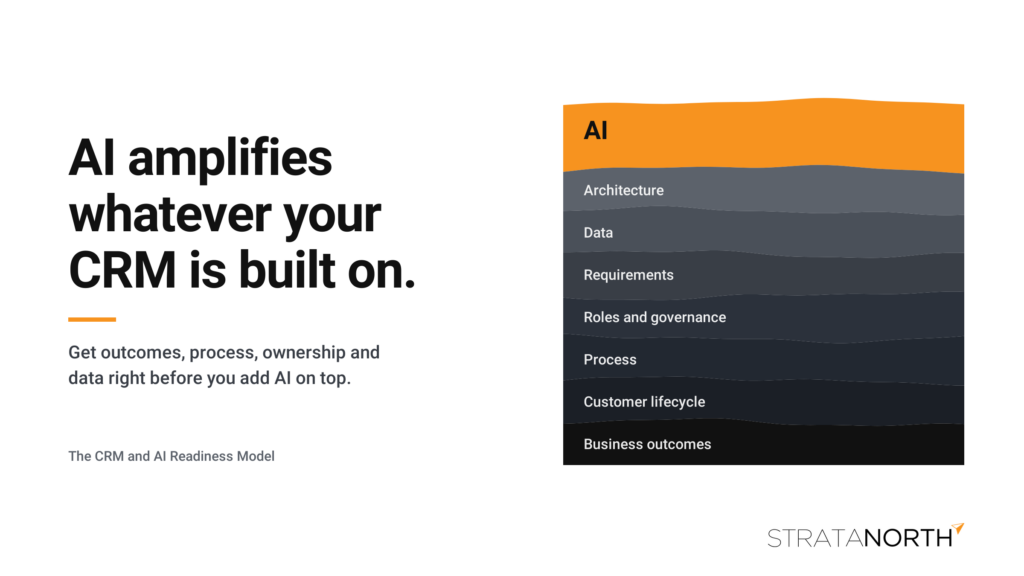
Build automations on accurate processes and ownership mapping.
Key Takeaways
-
Define business outcomes, the customer lifecycle and key process decisions before you write a single feature requirement.
-
Treat AI as its own portfolio of use cases, each with a defined level of autonomy and a readiness gate before it reaches production.
-
Connect outcomes, processes, requirements, data, systems and AI use cases in one traceability chain so every configuration decision can be traced back to the business problem it solves.
The CRM and AI Readiness Model
The framework I recommend is built around eight workstreams:
|
Workstream |
Core question |
Primary deliverable |
|---|---|---|
|
Business outcomes |
Why are we doing this? |
Outcome and KPI charter |
|
Customer lifecycle |
How should customers move through our business? |
Customer lifecycle map |
|
Process |
How should work happen? |
Current- and future-state process maps |
|
Roles and governance |
Who owns what? |
RACI and decision-rights matrix |
|
Requirements |
What must the platform enable? |
Business requirements catalog |
|
Data |
What information makes those processes work? |
Data model and governance matrix |
|
AI |
Where should AI assist, automate, recommend or decide? |
AI use-case inventory |
|
Architecture |
What other systems participate? |
CRM ecosystem and integration map |
The sequence matters. Don’t begin by asking which CRM features you need. Start with the business. The 12 steps below work through the model in that order.
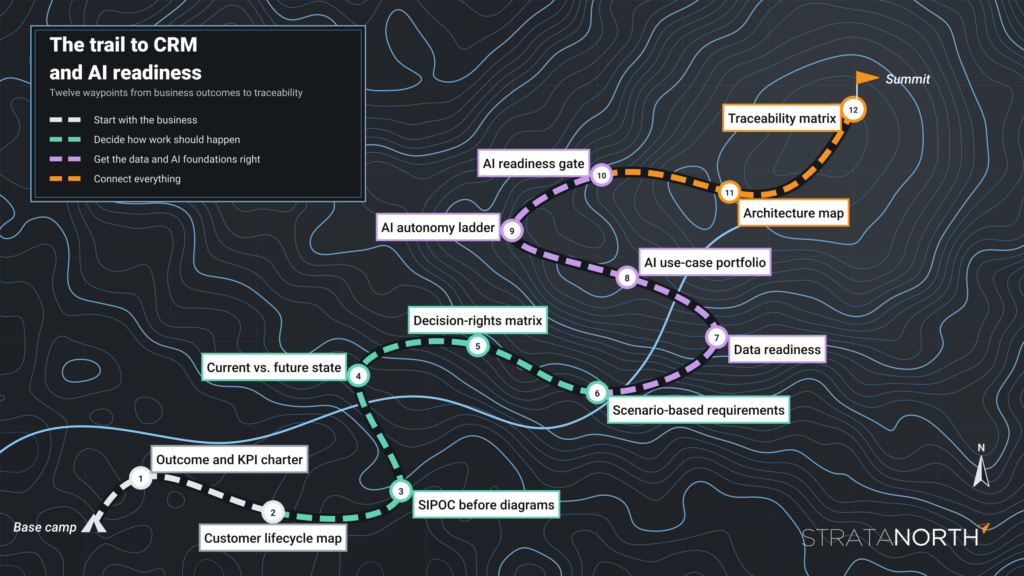
Twelve waypoints from business outcomes to traceability.
Start With the Business
1. Write an outcome and KPI charter
Before documenting a single feature, have the organization complete this statement:
We are implementing CRM because we need to improve ______ from ______ to ______.
That produces a much better conversation than “we need a better CRM.” Examples include reducing lead response time from 24 hours to two hours, improving lead-to-opportunity conversion, increasing forecast accuracy, shortening customer onboarding, raising renewal rates, reducing service resolution time, adding sales capacity without adding headcount, or establishing one reliable view of the customer.
For each objective, document the baseline, target, measurement method, owner and timeframe. This pays off later. When someone proposes another customization or AI capability, you can ask which business outcome it supports. If nobody can answer, you may have found scope rather than a requirement.
2. Map the customer lifecycle
Do this before detailed process mapping. Lay the lifecycle out horizontally:
Awareness → Inquiry → Lead → Qualification → Opportunity → Proposal → Customer → Onboarding → Service → Renewal → Expansion → Advocacy
Under each stage, document the responsible function, entry and exit criteria, required information, major activities, systems involved, handoffs, customer communications and KPIs.
This often shows that what looked like a CRM project is really an operating-model integration problem between marketing, sales, operations, customer service, finance and IT. Those boundaries are where CRM implementations usually get difficult.
Decide How Work Should Happen
3. Use SIPOC before detailed process diagrams
You don’t need consultants spending months producing hundreds of process diagrams. A more effective progression is SIPOC, then detailed workflow, then exceptions.
SIPOC stands for supplier, input, process, output and customer. Take lead qualification. Instead of drawing a complicated flowchart right away, document:
|
SIPOC element |
Lead qualification example |
|---|---|
|
Supplier |
Website, events, partners, outbound campaigns |
|
Input |
Contact, company, source, product interest, geography |
|
Process |
Enrich → score → route → review → qualify |
|
Output |
Qualified lead, rejected lead, nurture candidate |
|
Customer |
Sales representative or account executive |
Then start asking questions. Who owns the lead? What counts as qualified? What happens when information is missing? Can sales reject it, and what happens to rejected leads? How quickly must someone respond? What determines routing? What happens when the lead belongs to an existing customer or an open opportunity?
At that point, lead management stops being a line on a requirements spreadsheet and becomes a business process that needs organizational decisions. Save detailed Business Process Model and Notation (BPMN) or swimlane diagrams for the processes that warrant them.
4. Document the current state, but design the future state
A common mistake is documenting everything the company does today and turning it into CRM requirements. That can mean spending millions of dollars recreating yesterday’s problems in newer technology.
For each major process, trace the line from the current state to the technology requirement:
|
Step |
Example |
|---|---|
|
Current state |
Sales reps manually assign opportunity probability. |
|
Pain point |
Forecasts vary dramatically by salesperson. |
|
Root cause |
Opportunity stages lack objective exit criteria. |
|
Future state |
Each stage has defined, evidence-based criteria. |
|
Business rule |
An opportunity can’t enter Proposal without an identified decision-maker, estimated value and expected decision date. |
|
CRM requirement |
Stage-gating rules and required fields. |
That lineage is valuable during implementation because you can trace any configuration decision back to the business problem it was meant to solve.
5. Create a decision-rights matrix
Some of the hardest CRM problems aren’t technical. They’re unresolved organizational decisions. Document who has the authority to decide:
-
Who owns an account, who can create one and who can merge duplicates
-
Who owns a lead and who defines qualification
-
Who can change opportunity stages and who determines when an opportunity is lost
-
Who owns pricing and who approves discounts
-
Who owns customer data and who defines marketing consent
A RACI chart (responsible, accountable, consulted, informed) helps here, but supplement it with explicit decision rights. CRM projects get unnecessarily difficult when five departments discover during configuration that they have five different answers to the same question.
6. Write requirements as scenarios, not feature names
Requirements like these don’t tell a vendor much:
Lead management: Required. AI: Required. Forecasting: Required. Marketing automation: Required.
Write scenario-based requirements instead:
When an inbound lead belonging to an existing account is received, the system should identify the account, notify the account owner, evaluate existing open opportunities and route the lead according to defined ownership rules.
Now vendors have something meaningful to demonstrate. Categorize each requirement as must have, should have, could have or future, then add dimensions such as business importance, frequency, affected users, regulatory impact, data dependency, integration dependency and implementation complexity.
That’s the structure behind our CRM Vendor Capability Matrix, and we covered how to test vendor claims against scenarios like these in Every CRM Vendor Says Yes.
Get the Data and AI Foundations Right
7. Assess data readiness
AI makes this step substantially more important. For every important CRM data domain, identify:
System of record → Data owner → Steward → Source → Consumers → Quality → Completeness → Sensitivity → Retention → Update frequency
Do this for accounts, contacts, leads, opportunities, products, activities, transactions, cases, contracts, marketing interactions, consent and any other relevant objects. Then assess the data for completeness, accuracy, consistency, uniqueness, timeliness and lineage.
If sales has three definitions of “customer,” marketing has duplicate contacts, ERP owns product and pricing information and service data lives somewhere else, an AI assistant won’t create a single view of the customer. It will inherit the ambiguity.
8. Treat AI as its own use-case portfolio
This is where I’d modify traditional CRM methodology. Don’t create one requirement called “AI capabilities.” Build an AI use-case matrix, and for each use case document:
Business problem → User → Trigger → Inputs → AI action → Output → Human review → System action → Risk → KPI
Take opportunity risk detection. Inputs could include CRM activity, stage duration, email interactions, meeting history, stakeholder engagement, opportunity changes and historical outcomes. The AI might report: “This opportunity has elevated risk because no decision-maker has participated in 21 days, the expected close date has moved twice, and engagement has declined.”
Then decide what the AI should do with that. Should it inform the salesperson, recommend an action, create a task or automatically change the forecast category? Those are very different levels of autonomy.
9. Place each use case on an AI autonomy ladder
|
Level |
What AI does |
|---|---|
|
0: Retrieve |
Finds information |
|
1: Summarize |
Summarizes account history, meetings, cases or opportunities |
|
2: Recommend |
Suggests a next best action, lead score or opportunity risk |
|
3: Act with approval |
Drafts an email, creates a quote, updates fields or starts a workflow after a person confirms |
|
4: Act autonomously |
Executes actions within predefined policies without human approval |
The higher a use case sits on the ladder, the more governance, observability, permissions, auditability, testing and exception handling matter. The ladder also keeps organizations from lumping very different capabilities together under the word “AI.”
10. Put every use case through a readiness gate
Before approving an AI use case for production, the organization should be able to answer:
-
Is the underlying process defined?
-
Is the underlying data trustworthy?
-
Is the authoritative source known?
-
Are permissions appropriate?
-
Is the expected output measurable?
-
Can incorrect output cause material harm?
-
Does a person need to approve the result?
-
Can the AI action be audited and reversed?
-
Who owns the use case after go-live?
If those questions don’t have answers, the capability probably isn’t ready for production, however impressive the vendor demo looked.
Connect Everything
11. Build the architecture map before vendor selection
Create a simple ecosystem diagram showing how CRM connects to ERP, marketing automation, ecommerce, customer service, your data platform, identity, collaboration and productivity tools, analytics and AI. For each interface, document the data exchanged, direction, frequency, system of record, integration mechanism and business owner.
This prevents a classic evaluation mistake, which is assessing the CRM as though it exists in isolation. It rarely does.
12. Finish with a traceability matrix
The final model connects everything:
Business outcome → Process → Requirement → Data → System → AI use case → Test scenario → KPI
Here’s how that chain looks for forecast accuracy:
|
Link |
Example |
|---|---|
|
Outcome |
Increase forecast accuracy |
|
Process |
Opportunity management |
|
Business rule |
Objective stage-exit criteria |
|
Requirement |
Configurable stage gating |
|
Data |
Opportunity stage, close date, activities, contacts |
|
AI use case |
Opportunity risk scoring |
|
Test scenario |
Identify stalled opportunities |
|
KPI |
Forecast variance |
Now you’re no longer buying CRM features. You’re designing a business capability. The same chain carries into implementation, where it becomes the basis for holding your system integrator to what you bought. We covered that in You Chose the CRM. Is Your SI Delivering What You Bought?
The Hard Part Hasn’t Changed
CRM technology has become extraordinarily sophisticated. Determining what it can do is the easy part. The hard part is deciding how your organization should operate, what information it needs to operate that way, who owns the decisions, and where technology and AI should support the people doing the work.
The more prepared, organized and well documented your business is, the better your outcomes when you evaluate and implement a CRM. Everything in this framework comes from more than two decades of leading organizations of all sizes through that work.
Need Help Building Your Readiness Model?
StrataNorth helps organizations define outcomes, map processes, set data and AI governance, and evaluate CRM platforms. We don’t resell CRM software and we have no AI add-ons to sell you, so our recommendations start with how your business needs to operate.
Start with the free CRM Readiness Assessment to see where your foundations stand, then use the CRM Vendor Capability Matrix to turn your scenarios into a scored evaluation. When you want an independent perspective, book a CRM exploration call or explore our CRM advisory services.
AI will amplify whatever your CRM is built on. Make sure it’s built on decisions your business has made.
Listen: The CRM Advantage, Episode 1, Building the Foundation: CRM Strategy Before Software
Previous in this series: AI in CRM: Why Data Quality and Business Readiness Still Matter
Next in this series: The Evolution of CRM: How Complexity Moved from the Server Room to AI